The Live panel
Live is the panel on the right. When an agent builds something you can use, like a small website or a price list, it opens here. If your agents have a web browser or a computer set up to use for you, you can watch them in Live too. Press Live in the top bar to open or close it.
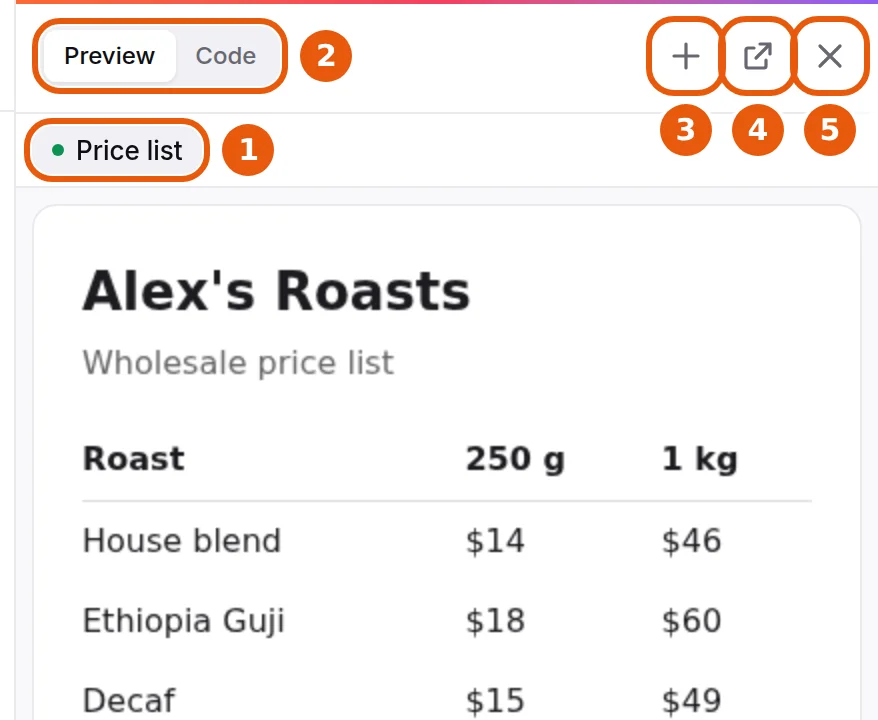
- Tabs: one tab for each thing open in Live. Click a tab to switch.
- Preview / Code: for a page your agent made, Preview shows the page. Code shows the instructions it is built from, which most people never need.
- +: open a screen your agents can use, like a web browser or a computer, when one is set up for you.
- Open in new tab: open the page in its own browser tab.
- ×: close the panel. Press Live to open it again.
If a site your agent is using needs you to sign in, press Take over, sign in yourself, then press Hand back so your agent can carry on.
On a phone, Live opens full screen.
Didn’t answer your question? Email support@ipsion.ai and say what you were trying to do.