用量限制,以及“它还在运行吗?”
达到用量限制时,什么都不会丢。 你的消息会排队等着,限制重置后自动发出。你会看到“Your message is queued. It starts at about (time), and the reply will show up here by itself.”(你的消息已排队,大约在(某个时间)开始,回复会自动出现在这里。)如果不知道什么时候重置,你会看到“Your agent is over capacity right now. Your message is saved and will run by itself; check back in a few hours.”(你的智能体现在容量已满。你的消息已保存,会自动运行;过几个小时再来看看。)
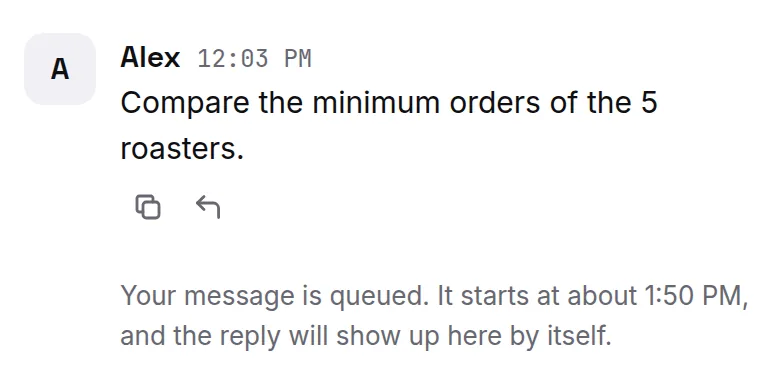
容量已满时,新工作区也可能先打开。这时你会看到“Your agent is getting set up and will say hello here as soon as capacity frees up.”(你的智能体正在准备中,容量一空出来就会在这里跟你打招呼。)你什么都不用做:智能体准备好后会先给你发消息。
- 如果你在那之前又发了一条消息,我们会马上再试一次;如果智能体回复了,排队的消息会立刻发出。
智能体工作时继续发消息
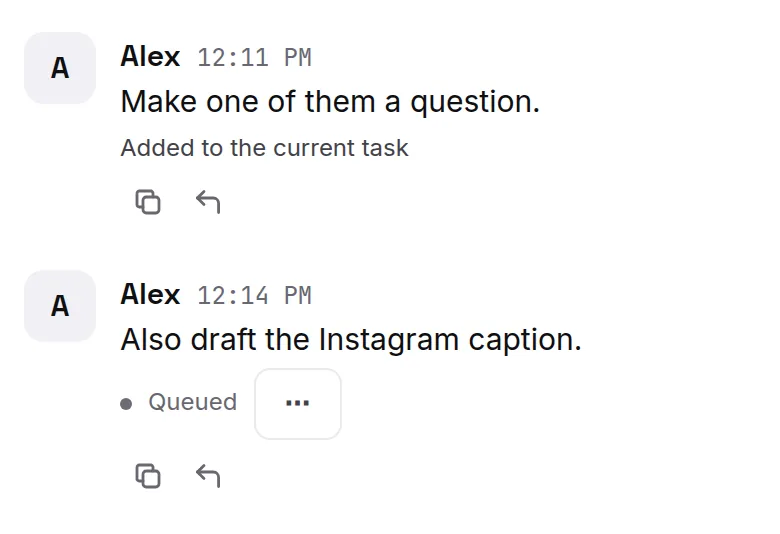
智能体还在工作时,你也可以再发消息。消息下方会显示它去了哪里:先是 Queued(排队中),然后是 Added to the current task(已加入当前任务)、Running alongside(同时进行)或 Up next(下一个)。显示 Queued 时,点击 ⋯ 可以编辑或取消这条消息。想问不相关的事,点击 + 开一个新话题。
它还在运行吗?
长任务需要一些时间。如果你看到下面任意一条,说明智能体还在处理,会在同一个地方回复你:
- “Your message is queued. Ipsion agent is still working on it and will reply here automatically.”(你的消息已排队。Ipsion 智能体还在处理,会自动在这里回复。)
- “Something went wrong on our side. Ipsion agent is still working on it now…”(我们这边出了点问题。Ipsion 智能体正在继续处理……)
- “This one is taking a long time. The reply will show up here when it's ready; reopen the conversation to check.”(这次需要的时间比较长。回复准备好后会出现在这里;重新打开对话就能查看。)
- “Something went wrong on our side. Ipsion is on it and will reply here as soon as it's fixed.”(我们这边出了点问题。Ipsion 正在处理,修好后会马上在这里回复。)
遇到以上任何一种,你都不用做什么:不要重发消息。
如果你看到“Your message didn't reach the agent. It's back in the box below”(你的消息没有送达智能体,已经退回到下方的输入框),请再发一次。
没有找到答案?发邮件到 support@ipsion.ai,说说你当时想做什么。