Help · Using Ipsion
Usage limits, and "is it still running?"
When a usage limit is reached, nothing is lost. Your message waits and goes out by itself when the limit resets. You see "Your message is queued. It starts at about (time), and the reply will show up here by itself." If the reset time isn't known, you see "Your agent is over capacity right now. Your message is saved and will run by itself; check back in a few hours."
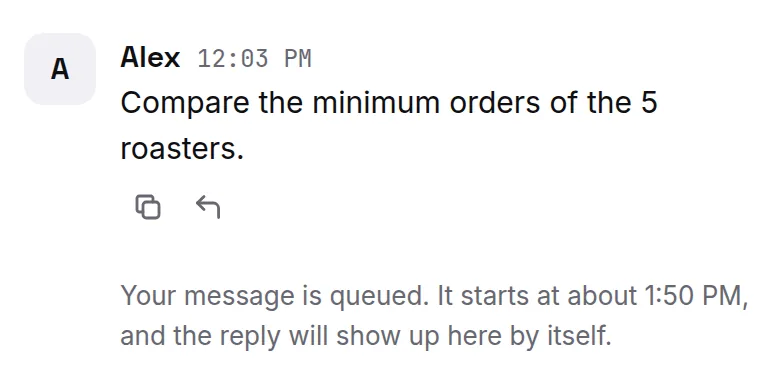
- If you write again before then, we try once more straight away, and if your agent answers, the waiting messages go out at once.
Writing while your agent works
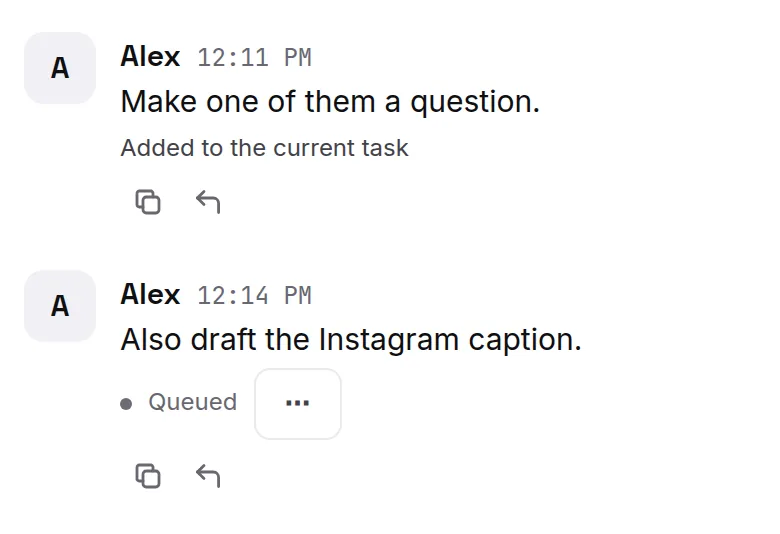
You can send another message while your agent is still working. Under it you see where it went: Queued, then Added to the current task, Running alongside or Up next. While it shows Queued, press ⋯ to edit or cancel it. To ask something unrelated, start a new thread with +.
Is it still running?
Long tasks take a while. If you see one of these, your agent is still on it and will reply in the same place:
- "Your message is queued. Ipsion agent is still working on it and will reply here automatically."
- "Something went wrong on our side. Ipsion agent is still working on it now…"
- "This one is taking a long time. The reply will show up here when it's ready; reopen the conversation to check."
- "Something went wrong on our side. Ipsion is on it and will reply here as soon as it's fixed."
There is nothing to do for any of these: don't send the message again.
If you see "Your message didn't reach the agent. It's back in the box below", send it again.
Didn’t answer your question? Email support@ipsion.ai and say what you were trying to do.